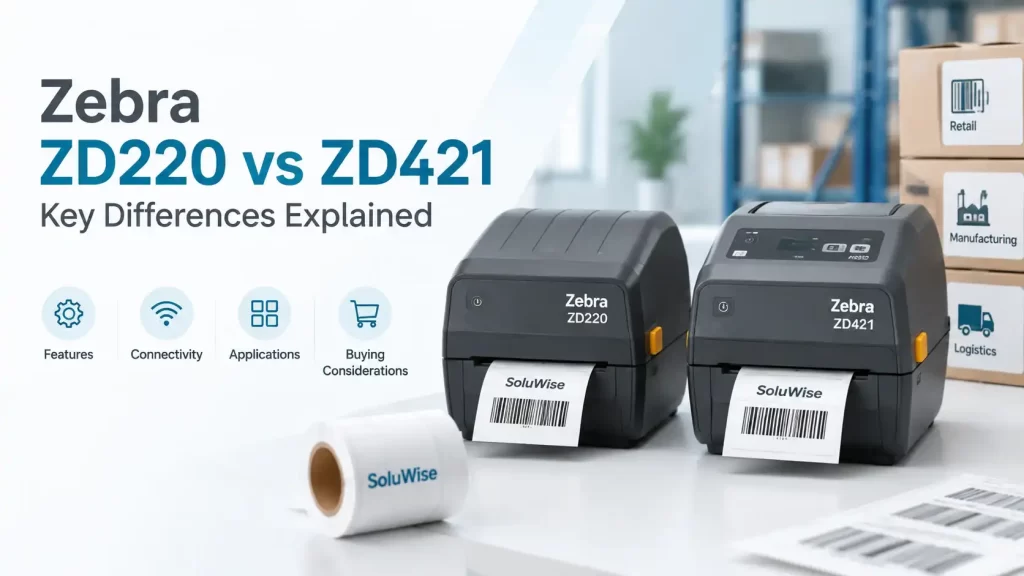
Choosing between the Zebra ZD220 vs ZD421 usually comes down to how often labels are printed, how much flexibility the application needs and how likely the operation is to grow. Both are desktop barcode printers, but they are aimed at different levels of day-to-day demand.
For straightforward, lower-volume labelling with a controlled setup, the Zebra ZD220 is often the sensible starting point. The Zebra ZD421 is the stronger choice where teams need more configuration options, improved connectivity choices, higher-resolution printing options or a printer that can adapt to changing workflows.
The right decision is not simply about buying the lower-priced unit or selecting the model with more features. It is about matching the printer to the labels, environment, users and workload it will face.
Zebra ZD220 vs ZD421: the practical verdict
The Zebra ZD220 suits businesses that need dependable desktop barcode printing for predictable, basic applications. Typical examples include retail price labels, basic product identification, dispatch labels and small batches of warehouse location labels.
The Zebra ZD421 is more suitable for businesses that need greater adaptability. It is better aligned with operations that may require different connectivity arrangements, finer print for smaller labels or denser barcodes, more frequent media changes, or a higher expected printing workload.
A small retailer printing price labels from one PC may find the ZD220 entirely adequate. A warehouse, manufacturer, clinic, hotel operation or growing e-commerce team may find that the ZD421’s additional options make it the more economical choice over its working life.
| Selection factor | Zebra ZD220 | Zebra ZD421 |
|---|---|---|
| General position | Entry-level desktop label printer | More configurable desktop label printer |
| Best for | Predictable, straightforward label jobs | Growing or more varied labelling operations |
| Print method options | Available in direct thermal or thermal transfer versions, depending on model | Available in direct thermal or thermal transfer configurations, depending on model |
| Resolution options | Standard-resolution printing for common barcode labels | Configuration options can include higher resolution for finer detail |
| Connectivity | Suited to simple connected setups | More connectivity and configuration flexibility, depending on model |
| Upgrade headroom | Limited compared with the ZD421 platform | Better suited to changing integration and application needs |
Exact features depend on the ordered configuration. Buyers should confirm the print method, resolution, interface and regional model details before purchase rather than assuming every ZD220 or ZD421 has the same specification.
Print method: direct thermal or thermal transfer?
This is often the first and most important decision in a desktop label printer comparison. Direct thermal printers create an image on heat-sensitive media without a ribbon. Thermal transfer printers use a ribbon to transfer ink onto the label material.
Where direct thermal makes sense
Direct thermal is a practical fit for short-life labels such as courier labels, temporary carton labels, pick-and-pack labels and short-term warehouse identification. It avoids ribbon management and can make routine label production simpler.
However, direct thermal labels can be less suitable where labels must remain readable for a long period or may face heat, sunlight, abrasion or chemical exposure. In UAE operations, labels left in warm vehicles, exposed warehouse areas or outdoor handling points deserve particular material consideration.
Where thermal transfer is the better fit
Thermal transfer is generally the stronger option for durable product labels, asset labels, shelf labels, inventory labels and labels that need to remain legible through handling and storage. The result depends on selecting a compatible ribbon and label face material, not on the printer alone.
For example, a manufacturer applying identification labels to cartons stored indoors may use paper labels and a suitable wax-based ribbon. An asset-label application may require a more durable synthetic material and a ribbon selected for the expected surface and exposure. A label sample should be tested before committing to a large order.
Resolution and barcode readability
Resolution affects the amount of detail a printer can place on the label. Standard resolution is commonly sufficient for ordinary retail barcodes, carton labels, stock labels and larger text. A higher-resolution configuration can be useful for small labels, compact text, fine graphics and dense two-dimensional codes.
The ZD421 offers more resolution flexibility than the ZD220 range, depending on the specific configuration. That does not mean every application needs higher resolution. Printing a simple large carton barcode at a higher resolution may add cost without delivering a practical benefit.
Barcode readability also depends on label size, print darkness, media quality, ribbon compatibility, scanner performance and the barcode design. A printer produces the symbol; it does not create a GS1-issued number or register a product. Businesses using GS1 identifiers should obtain and manage those identifiers through the appropriate GS1 process, then print the correctly formatted data on their labels.
Connectivity and system integration
Connectivity can become the deciding factor after the printer has been installed. A basic USB-connected printer may work well for a single workstation in a shop, receiving desk or packing station. It can be less convenient if multiple users need access or if the printer later needs to connect to a networked workflow.
The ZD421 is generally the more flexible platform for organisations that need to consider wired or wireless connectivity options, device management or integration with changing systems. The exact interfaces available vary by model, so purchasing teams should state how the printer will connect: directly to a PC, through a network, to a mobile device, or as part of a warehouse or point-of-sale environment.
A common purchasing mistake is selecting the printer first and asking about the connection method later. IT teams should confirm the operating environment, software compatibility, user permissions and physical printer location before an order is placed.
Media handling and daily workload
Both printers are desktop units, so they are best assessed as workstation printers rather than as substitutes for industrial machines. They can suit many business applications, but the number of labels, frequency of use and required operator intervention should be realistic.
The ZD220 is appropriate where print jobs are relatively modest and predictable. A retail counter producing price labels periodically, or a small business printing dispatch labels during the day, may not need the extra capability of a higher-tier model.
The ZD421 is a better consideration where label production is more frequent, users may change label formats regularly, or operations may add new requirements. Examples include a warehouse printing stock, location and shipment labels; a manufacturer printing varied product labels; or a hospitality operation introducing asset or laundry tracking labels alongside ordinary stock labels.
Daily volume alone is not the only issue. A printer producing a few hundred labels in one concentrated dispatch window can experience a different working pattern from a printer producing the same number gradually through the day. Discussing the busiest hour, not just the monthly estimate, gives a more useful basis for selection.
Total cost of ownership: look beyond the printer price
A ZD421 price in the UAE may be higher than a basic ZD220 configuration, but the initial purchase price is only one part of the calculation. The lower-cost printer is not automatically lower cost if it requires replacement earlier, cannot connect to the required system or cannot print the labels needed for a new application.
Consider these ownership costs before choosing:
- Labels and ribbons: Direct thermal media may suit short-life uses, while thermal transfer supplies add ribbon cost but can support more durable label constructions.
- Downtime: A mismatch between printer, media and workload can create reprints, scanner failures and interruptions at receiving or dispatch.
- Future applications: A business adding smaller labels, new barcode formats, asset tagging or networked printing may need more flexibility than it first expected.
- Operator time: Clear media setup, consistent label stock and the correct printer configuration reduce avoidable errors.
- Supportability: Standardising printer models and approved label materials can make it easier for operations and IT teams to maintain a consistent process.
For a stable, uncomplicated task, the ZD220 can represent good value. For an operation where requirements are likely to change, the ZD421 may reduce the risk of a premature replacement.
Recommended applications for each Zebra printer
Zebra ZD220: for essential desktop label printing
The Zebra ZD220 is an entry-level desktop printer intended for straightforward barcode and label-printing tasks. It suits businesses with a defined application, a modest and predictable workload, and a simple connection arrangement.
It can be a sensible choice for retail shelf or price labels, basic inventory labels, shipping labels, simple product identification and office-based labelling. Buyers should choose the correct direct thermal or thermal transfer version for their labels. It may be less suitable where the operation needs expanded connectivity, finer-detail printing or frequent changes in label requirements.
Zebra ZD421: for flexibility and growth
The Zebra ZD421 is a desktop barcode printer platform designed for organisations that require more options than a basic entry-level unit. It suits applications where connectivity, resolution, media choice or future adaptation may influence the purchase.
It is a strong candidate for warehouse and logistics teams, manufacturers, healthcare and administrative identification tasks, retail back offices and businesses with more than one label format. Its limitation is that added capability can be unnecessary for a fixed, low-volume job, so the configuration should still be selected carefully rather than buying features that will not be used.
Checks to make before ordering
- Measure the label. Confirm width, height, gap or black mark, core size and roll outside diameter.
- Define label life. State how long the label must remain readable and what it may encounter during transport, storage or use.
- Choose the print method. Decide between direct thermal and thermal transfer based on durability requirements.
- Provide the busiest printing estimate. Include labels per day and labels in the busiest hour.
- Confirm connectivity. Identify the computer, network or software environment that will send print jobs.
- Test the finished label. Scan representative labels and check adhesion, print quality and handling performance in the actual application.
Frequently asked questions
Is the Zebra ZD220 or ZD421 better for a small business?
The ZD220 is often suitable for a small business with a single, predictable labelling task. The ZD421 is more appropriate if the business expects to add label types, users, connectivity requirements or more demanding barcode layouts.
Can both printers print shipping labels?
Both can be considered for shipping-label applications when the selected configuration, label size and connection method suit the workflow. Direct thermal labels are commonly used for short-life shipping labels, but the actual label material should match the handling and storage conditions.
Do I need thermal transfer printing for product labels?
Not always. Short-life labels kept indoors may work with direct thermal media. Thermal transfer is generally preferable when label durability, resistance to handling or longer readable life is required.
Does a higher-resolution printer make every barcode easier to scan?
No. Higher resolution can help with small text and dense codes, but barcode performance also depends on the barcode dimensions, contrast, print settings, label material and scanner. A correctly sized barcode printed well at standard resolution can scan reliably.
Can a barcode printer create GS1 barcodes?
A barcode printer can print barcode data in the required format, but it does not issue GS1 company prefixes, register products or certify a barcode. Those are separate administrative and data-management matters.
Which printer is better for UAE warehouse conditions?
The choice depends on workload and label durability. For temporary indoor labels, a simpler configuration may be sufficient. For labels exposed to heat, handling or longer storage, assess thermal transfer media and ribbon compatibility as well as the printer model.
Making the final choice
Choose the Zebra ZD220 when the label job is stable, straightforward and modest in scale, and the selected configuration meets the required print method and connection setup. Choose the Zebra ZD421 when flexibility matters: more varied labels, denser print, evolving connectivity needs or a workload that may grow.
A practical decision rule is simple: buy the ZD220 for a clearly defined basic task; consider the ZD421 when the cost of outgrowing the printer would be greater than the cost of selecting additional capability now. SoluWise can help assess label dimensions, material, ribbon requirements, expected print volume and printer compatibility before a final selection is made.