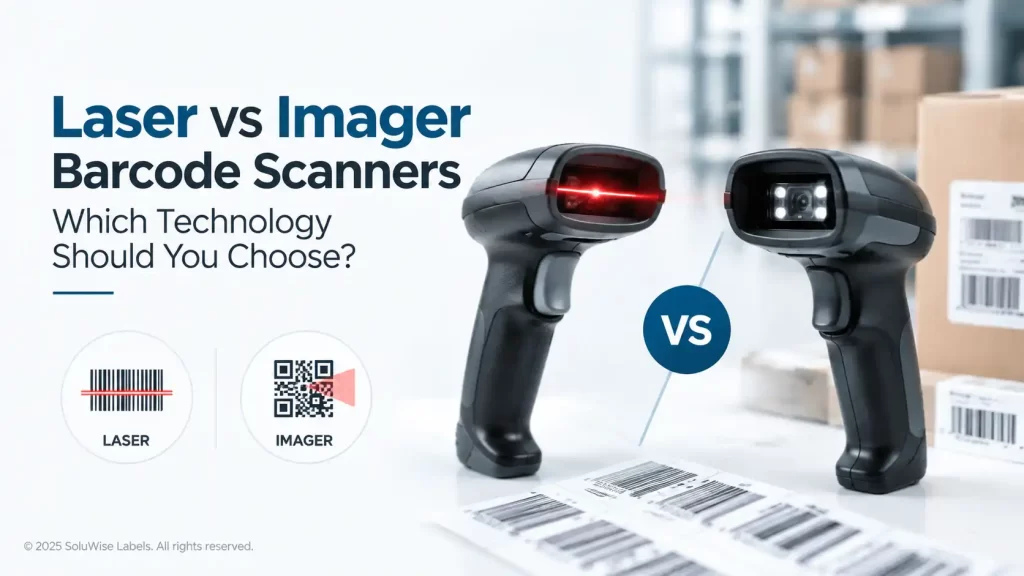
A warehouse team scans carton labels all day, while a retail cashier needs to scan a customer’s phone screen. Those are different jobs, and the laser vs 2D scanner decision usually becomes simple once the barcode types and working conditions are clear.
For most new purchases, a modern 2D imaging scanner is the safer choice. It reads standard 1D barcodes as well as 2D codes such as QR codes and Data Matrix, and it can usually scan from screens and cope better with labels that are scratched, creased or poorly printed. A 1D laser scanner still has a place where every code is a clean, printed 1D barcode and the budget is tight.
The mistake is buying a basic laser scanner because current labels are 1D, then finding that a supplier, delivery platform or internal system starts using QR codes six months later. Replacing a scanner is rarely difficult, but buying once is usually better.
Laser vs 2D scanner: the practical difference
| Point of comparison | Laser scanner | 2D imaging scanner |
|---|---|---|
| How it reads | Uses a laser beam to read the pattern of bars and spaces in a 1D barcode. | Captures an image of the code and decodes the full barcode pattern. |
| Barcode types | Typically reads 1D linear codes only. | Reads 1D codes and, depending on the model, 2D codes such as QR and Data Matrix. |
| Phone and tablet screens | Often unsuitable or unreliable. | Usually the appropriate choice for scanning displayed codes. |
| Damaged labels | May fail if the scan line crosses a damaged section. | Can often decode a partially damaged code if enough of the symbol remains readable. |
| Scanning angle | Needs the laser line to pass through the barcode. | Usually allows more freedom in how the operator presents the code. |
| Typical fit | Fixed 1D scanning tasks with good-quality printed labels. | Mixed barcode use, mobile codes, future flexibility and difficult labels. |
Neither technology fixes a badly designed or badly printed barcode. A scanner can only work with the contrast, size and quiet zones available on the label. If carton labels are rubbing against pallet wrap, getting wet in a cold room or fading in heat, the label material and print method need attention as well as the scanner choice.
Explore Barcode Scanners by Brand
Compare barcode scanning solutions from leading manufacturers.
Explore the available models from Zebra, Datalogic and Honeywell
to find a scanner suited to your barcode types, workplace and
scanning requirements.



How laser barcode scanners work
A laser scanner projects a narrow beam across a linear barcode. The dark bars and light spaces reflect the beam differently, and the scanner converts that reflected pattern into data. It is a focused method that works well for familiar 1D symbols printed cleanly on paper labels or packaging.
For a retail counter that scans only standard product barcodes, or a stock room using basic 1D item labels, a laser scanner can be perfectly reasonable. Operators often find the visible line intuitive because they can see where they are aiming.
The limitation is built into the technology. A 1D code stores its data across one horizontal direction. A laser scanner reads that line. It cannot properly interpret a square 2D code that stores data both across and down, and it may struggle with a barcode shown on a glossy phone display.
Where a laser scanner can still make sense
- A fixed counter or workstation scans only printed 1D barcodes.
- The labels are generally clean, undamaged and consistently positioned.
- No QR codes, mobile vouchers, electronic tickets or 2D delivery labels are expected.
- The application has been checked carefully and there is a genuine cost reason to keep the purchase basic.
That last point matters. A laser scanner is not obsolete simply because imagers are more versatile. It is just narrower in what it can do.
How 2D imaging scanners work
A 2D imager uses an image sensor and decoding software. Rather than reading one line across the symbol, it captures the barcode as an image and looks for the complete pattern. This is why an imager can read both ordinary 1D barcodes and 2D symbols.
In daily use, imaging barcode scanner technology is often more forgiving. A picker can approach a label at a slight angle, a cashier can scan a QR code from a phone, and an engineer can scan a Data Matrix code on a component label. The exact reading range and tolerance will vary by scanner model, but the underlying advantage remains.
Modern 2D imaging scanners are generally the right recommendation for UAE businesses buying new equipment for warehouse, retail, field service, healthcare-related inventory or hospitality operations. They allow room for changing workflows without asking staff to use a different device for every code format.
Why 2D imaging helps with damaged barcodes
A laser scanner depends heavily on getting a usable scan line through the barcode. If a tear, scuff or wrinkle disrupts that line, the read can fail even if much of the code still looks visible to a person.
An imager assesses more of the barcode symbol. It may decode a label with some damage, provided enough of the required pattern remains. This is helpful for carton labels handled repeatedly in a Dubai warehouse, shelf labels exposed to regular cleaning, or asset labels that collect scratches over time.
It is not permission to accept poor labelling. If barcodes frequently fail, check the print darkness, printhead condition, label surface, barcode size and placement. A damaged code that scans today may not scan after another delivery cycle.
1D barcode limitations to plan for
Most businesses still use 1D barcodes extensively. EAN and UPC retail codes, Code 128 warehouse labels and similar linear formats remain common. The issue is not that 1D codes are wrong; it is that a scanner limited to 1D creates a hard stop once a 2D code enters the process.
A QR code may be used for a digital receipt, a service record, a web link or a delivery process. Data Matrix codes are often used where a small symbol needs to hold more information. A laser scanner will not become 2D-capable through a settings change.
Also consider codes displayed electronically. Staff may need to scan a work order on a tablet, a loyalty code on a customer phone or a digital pick list. A 2D imager is the sensible choice for these situations.
Choosing a scanner by application
Retail and point of sale
If a shop only scans printed EAN product codes, a laser scanner can handle the core task. But retail workflows increasingly include QR promotions, mobile loyalty codes and electronic receipts. A 2D imaging scanner gives the counter more flexibility and avoids a second scanner for phone-based codes.
Warehouse and logistics
For receiving, picking and dispatch, 2D imaging scanners are usually the better long-term purchase. Warehouse labels can become scratched, dusty or creased, particularly on outer cartons and return stock. If operations use only clean, large 1D labels and scanning is predictable, laser remains an option, but it is a narrower one.
Pair scanner selection with the right barcode label material. A code that is clear when printed but smears or peels in use will cause delays regardless of the scanner. SoluWise can help match scanning equipment with suitable barcode labels for the application.
Manufacturing and asset tracking
Small parts, equipment tags and maintenance records often benefit from 2D symbols because they can store more information in a smaller space. A modern 2D imaging scanner suits teams that need to scan labels on tools, components, racks or fixed assets. The label itself still needs to be sized and printed properly for the available scanning distance.
Hotels, laundries and service teams
In hospitality and laundry settings, labels may be exposed to repeated handling, heat, moisture or cleaning processes. Scanner choice is only one part of the job. If a barcode is attached to a textile item or reusable asset, label construction matters just as much. A 2D imager is useful where codes may be worn or scanned from a handheld device, but it cannot compensate for a label that is no longer readable.
Where modern 2D imaging scanners fit
Modern 2D imaging scanners are the recommended product category for businesses that want one device to cover 1D labels, QR codes and other 2D symbols. They suit most new scanner deployments because they reduce the risk of being limited by a future barcode format.
They are especially appropriate for teams scanning from phone screens, handling mixed supplier labels, working with returned cartons, or using small 2D codes for assets and components. The main limit is practical rather than technical: the scanner still needs to be selected for the expected code size, distance, environment and connection to the existing POS, PC or mobile device.
Zebra, Honeywell and Datalogic all offer scanner ranges used across retail, warehouse and industrial applications. The right choice depends less on the badge and more on the actual job: code types, scanning distance, physical handling, connectivity and software compatibility. SoluWise can discuss those details before suggesting a suitable scanner from the barcode scanner category.
Checks before replacing a scanner that will not read
A barcode scanner not reading is not always a scanner failure. Before changing hardware, check a known-good barcode and work through the basics.
- Test several labels, not just one damaged item. If only one label fails, inspect its print quality, contrast, wrinkles and damage.
- Confirm the barcode type. A 1D-only laser scanner cannot read a 2D code.
- Try a different angle and distance. A code may be too close, too far away or heavily reflective.
- Check if the code is printed on a screen. A 2D imager is normally more suitable for displayed codes.
- Inspect the scanner window for dirt or damage, and check the cable, power and host connection.
- Review scanner configuration if the device reads the code but the correct data does not reach the software.
If the same labels fail across several scanners, investigate the printing process. Suitable barcode labels, clean printer settings and correct barcode sizing are usually more productive fixes than repeatedly replacing scanners.
FAQ
Is a 2D scanner the same as an imager scanner?
In normal purchasing language, yes. A 2D imager uses image-based scanning to read 2D codes and usually standard 1D barcodes too.
Can a laser scanner read QR codes?
No. A conventional laser scanner is designed for linear 1D barcodes. QR codes require a 2D imaging scanner.
Can an imager scanner read ordinary 1D barcodes?
Yes, modern 2D imaging scanners are commonly used to read both 1D and 2D barcode formats. Check the required symbologies for the specific scanner before purchase.
Why will my scanner read printed labels but not a phone screen?
The scanner may be a laser model, or the screen brightness, glare and code display size may be affecting the read. A 2D imager is normally the better technology for screen scanning.
Will a 2D scanner read a damaged barcode?
It can often read a partially damaged code better than a laser scanner, but there are limits. If too much of the symbol is missing, faded or obscured, the label needs replacing.
Should a UAE warehouse buy laser or 2D scanners?
For a new warehouse purchase, 2D imaging scanners are usually the more practical choice because they cover current 1D labels and allow for QR codes, Data Matrix symbols, screen scanning and less-than-perfect labels.
The sensible buying rule
Choose a laser scanner only for a controlled 1D job that is unlikely to change. Choose a 2D imager for almost any mixed, growing or screen-based operation. The extra flexibility is usually more useful than the narrow savings from buying a 1D-only device.
If the barcode type, label size or scanning distance is unclear, contact SoluWise with a sample label and a description of the workflow. The team can help assess suitable options from the barcode scanner category and identify any label-printing issue that may be causing failed scans.