
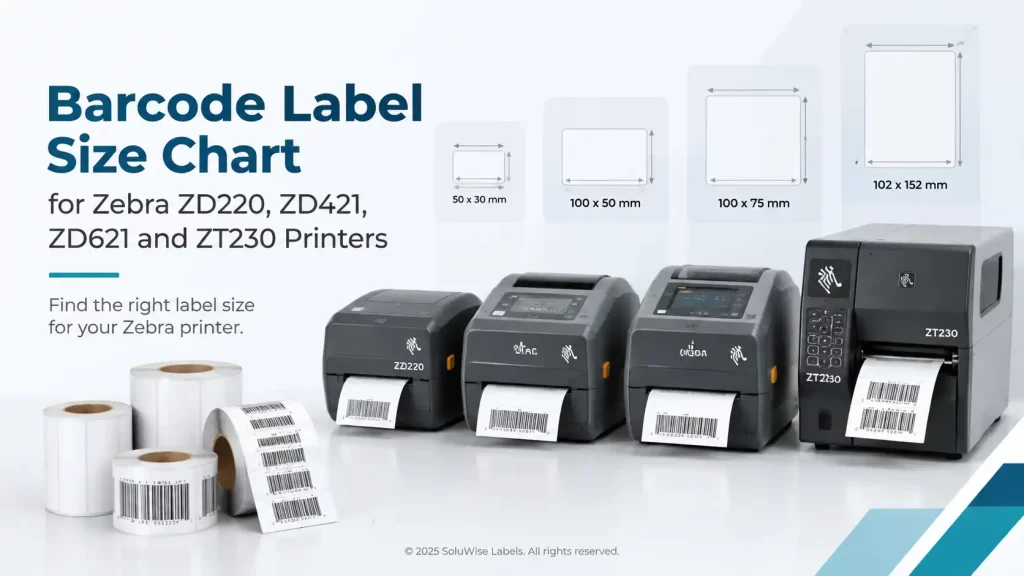
A label can physically fit into a printer and still be the wrong choice. The common problems are a label that is wider than the printable area, a roll that will not fit inside the printer, or a very short label that needs more careful sensor and print settings.
This barcode label size chart Zebra guide covers the Zebra ZD220, ZD421, ZD621 and ZT231. For standard 4-inch barcode labels, all four can print up to about 4.09 inches wide. The bigger difference is roll capacity and intended workload: the ZD220, ZD421 and ZD621 are compact desktop printers, while the ZT231 is better suited to larger rolls and regular warehouse production.
For many Dubai and UAE operations, the practical rule is simple: choose the label size first, then check the print width, media width and roll diameter. Do not choose a printer only because it is a 4-inch model.
Barcode label size chart Zebra ZD220, ZD421, ZD621 and ZT231
The figures below are the main dimensions to check for standard 4-inch versions of these Zebra printers. Print width is the maximum area the printhead can print across; it is not always the same as the widest media the printer can accept.
| Printer model | Maximum print width | Minimum label length | Maximum media roll diameter | Practical fit |
|---|---|---|---|---|
| Zebra ZD220 | Up to 4.09 in / 104 mm | About 0.25 in / 6.4 mm | Up to 5 in / 127 mm | Compact desktop printing of standard labels |
| Zebra ZD421 | Up to 4.09 in / 104 mm | About 0.25 in / 6.4 mm | Up to 5 in / 127 mm | Desktop use where more configuration flexibility is needed |
| Zebra ZD621 | Up to 4.09 in / 104 mm | About 0.25 in / 6.4 mm | Up to 5 in / 127 mm | Higher-demand desktop work and more frequent printing |
| Zebra ZT231 | Up to 4.09 in / 104 mm | About 0.25 in / 6.4 mm | Up to 8 in / 203 mm | Warehouse and production areas using larger rolls |
These are dimensional guides, not a substitute for checking the exact printer configuration. Print resolution, media sensor type, liner thickness, label construction, cutter or dispenser options, and the core size of the roll can affect the media that is practical to use. A label near the limit should always be checked against the relevant printer specification before ordering a large quantity.
Print width is the first limit to check
A 4-inch printer does not necessarily print across a full 4.25-inch or 4.5-inch label. The usable printed area on these models is typically up to 4.09 inches. A wider label may feed correctly but leave an unprinted strip at one side, or the layout may be clipped.
This matters with carton labels. A 100 mm-wide shipping label is generally within the print width of these printers. A 104 mm-wide label leaves little room for error. If the artwork includes a border, a barcode close to the edge, or mandatory information spread across the full width, allow a sensible margin rather than designing right to the printhead limit.
- For a 4 x 6 inch shipping label, all four printers are normally suitable from a width perspective.
- For a 100 x 150 mm carton label, the same applies, provided the roll and label material suit the printer.
- For labels wider than about 104 mm, a standard 4-inch ZD220, ZD421, ZD621 or ZT231 should not be assumed compatible.
- For narrow labels, print width is rarely the issue; sensor adjustment and label gap detection matter more.
Minimum label length and small-label printing
The listed minimum label length is about 0.25 inches, or 6.4 mm, but that number should be treated as a mechanical starting point. Very small labels are less forgiving than a 100 x 50 mm product label. The gap, black mark, liner, print speed and barcode size all need to work together.
A jewellery-sized label, a small electronics identification label or a narrow asset tag may be physically short enough for the printer but still produce a poor barcode if the barcode is reduced too far. Barcode readability depends on print quality, contrast, label material and the barcode dimensions, not simply on the printer accepting the stock.
For short labels, SoluWise would normally ask for the label width, height, gap or black-mark layout, material and the smallest barcode or text on the artwork. That prevents a common purchasing mistake: buying a roll that fits the printer but is difficult to calibrate or does not give enough room for a scan-friendly code.
Roll diameter affects downtime more than label size
The Zebra ZD220, ZD421 and ZD621 use desktop-sized rolls with a maximum outside diameter of about 5 inches. This is convenient for counters, retail back rooms, clinic stores and office dispatch desks, but rolls need replacing more often than on an industrial printer.
The Zebra ZT231 accepts rolls up to about 8 inches in diameter. That does not make its labels wider; its maximum print width remains around 4.09 inches. It simply lets a warehouse or production team load more labels at once. For a free-zone warehouse printing pallet, carton or location labels through the day, fewer roll changes can be a worthwhile operational advantage.
Roll diameter is measured across the complete roll, including the labels and liner. It is different from the core diameter, which is the hole in the middle of the roll. Both must suit the printer and, where applicable, the ribbon supply arrangement.
Which Zebra printer suits each label job?
Zebra ZD220 for straightforward desktop labels
The Zebra ZD220 is a compact desktop barcode printer suited to modest volumes of standard labels. It is a sensible option for retail price labels, basic product labels, shelf labels and dispatch labels where the media roll fits within the 5-inch diameter limit.
It is not the natural choice for a busy warehouse team that needs long unattended print runs. Nor is it the place to start if labels are unusual, extremely small, unusually thick or need frequent changes between several media types. In those cases, confirming the application before purchase saves time.
Zebra ZD421 for varied day-to-day desktop use
The Zebra ZD421 suits businesses that need a 4-inch desktop printer but expect more varied use. It can be a good fit for stock rooms, pharmacies, retail operations, light manufacturing and IT asset labelling where label formats may change and users need a more capable desktop platform.
The label size limits are broadly similar to the ZD220: up to about 4.09 inches of print width and 5-inch media rolls. The reason to choose it is not larger labels. It is a better match where the operation needs more flexibility around its printing workflow and configuration.
Zebra ZD621 for demanding desktop environments
The Zebra ZD621 is also a 4-inch desktop printer, so it does not solve a requirement for an extra-wide label or an 8-inch industrial roll. It suits higher-demand desktop applications where print activity is frequent and the business wants a more advanced desktop model.
Think of a dispatch bench producing labels throughout the day, a manufacturing work cell, or an asset-labelling project that runs in regular batches. If the volume becomes continuous enough that staff are constantly changing 5-inch rolls, moving to the ZT231 is usually the more practical conversation.
Zebra ZT231 for larger rolls and warehouse work
The Zebra ZT231 is an industrial barcode printer intended for heavier operational use than a desktop model. Its major advantage in this comparison is the ability to take larger media rolls, up to about 8 inches in outside diameter. That suits carton labels, warehouse location labels, inventory labels and production identification labels printed in substantial batches.
It is not automatically the right answer for a reception desk or a shop counter. It takes more space than a desktop printer, and a low-volume operation may gain little from its larger roll capacity. Choose it because the print workload and roll-change frequency justify it, not because it prints a wider label.
Match the label construction to the working conditions
Size is only one part of Zebra printer label compatibility. A direct thermal label can suit short-life dispatch work, such as a parcel label that is scanned within days or weeks. For labels that must remain readable in a hot UAE warehouse, on a carton with handling marks, or in storage for a longer period, a thermal transfer label and suitable ribbon may be the more sensible route.
The same applies to label adhesive. A label applied to a clean cardboard carton is a different job from one applied to a dusty plastic returnable crate, a chilled food container or an asset with a textured surface. Asking for a 100 x 50 mm label is not enough; the surface, temperature and expected label life should be part of the specification.
For a broader view of printer type, print volume and consumables, the SoluWise barcode printer buying guide is a useful next step before committing to a model.
Checks to make before ordering labels
- Measure the label width and length, not just the printed design. Include the liner and any gap or black-mark arrangement in the discussion.
- Keep the printed content inside the maximum 4.09-inch print width. Leave margin near the label edges, especially for borders and barcodes.
- Measure the outside diameter of the roll already in use if replacing existing labels. A 6-inch or 8-inch roll will not fit a desktop ZD220, ZD421 or ZD621.
- Confirm the roll core size and winding direction. A correctly sized label on the wrong core or wound in the wrong direction can still cause loading problems.
- State whether the printer uses direct thermal or thermal transfer media, and whether a ribbon is required for the application.
- Share the intended environment. Heat, cold-room condensation, abrasion and repeated handling can change the appropriate face material, adhesive and ribbon choice.
Frequently asked questions
Can a Zebra ZD220 print a 4 x 6 inch shipping label?
Yes, a 4-inch-wide by 6-inch-long label is within the typical maximum print width and media length capability of the ZD220. Check that the roll outside diameter is no more than about 5 inches and that the label material suits the printer configuration.
Do the ZD421 and ZD621 print wider labels than the ZD220?
No. In standard 4-inch versions, these desktop models have a similar maximum print width of about 4.09 inches. Their differences are more about capability, configuration and how they fit the workload, not extra print width.
Can the Zebra ZT231 print 8-inch-wide labels?
No. The 8-inch figure refers to maximum roll diameter, not label width. The ZT231 in this comparison prints up to about 4.09 inches wide.
What is the widest label I can use on these Zebra printers?
The media may be slightly wider than the printable area, depending on the model and label construction, but the usable printed width is about 4.09 inches. If information must print across the full label, keep the design within that limit.
Can I use small barcode labels on a Zebra 4-inch printer?
Usually, yes, provided the label length, gap or mark, liner and barcode artwork are appropriate. Short labels need careful calibration and a barcode large enough to scan reliably in the intended use.
Should I choose a desktop printer or a ZT231 for warehouse labels?
Choose based on output and roll changes. A desktop ZD220, ZD421 or ZD621 can suit a modest number of standard warehouse labels. If labels are printed regularly in long batches and staff need larger rolls, the ZT231 is generally the more practical fit.
Choose by width first, then by workload
For these Zebra models, a label up to about 4.09 inches wide is the key starting point. Then decide how many labels are printed between roll changes. A 5-inch desktop roll makes sense for lower-volume desk-based work; an 8-inch roll capacity makes the ZT231 more suitable for regular warehouse or production printing.
If the label is close to the width limit, unusually short, or intended for a difficult surface or environment, SoluWise can review the label dimensions, roll details and application before a full order is placed.


